A pipeline or power-line network usually starts as a set of centerlines in a GIS. Turning those lines into a satellite imagery area of interest (AOI) requires decisions about what to monitor, how much surrounding land to include, and which geometry the imagery supplier can accept. A polygon that passes an upload check can still leave a bend, branch or critical facility outside the order.
The practical approach is to preserve the full monitoring requirement, prepare supplier-compatible order areas around it, and verify the delivered imagery against the original requirement. Reducing the number of vertices is only one part of that process.
Start with the Monitoring Objective
Before creating a buffer, define the changes or risks the imagery needs to reveal. Construction activity near a buried pipeline, vegetation near a transmission corridor, and slope movement above an asset require different observation areas.
For pipeline monitoring, the AOI may need to include the right-of-way, access roads, river crossings, valve stations and nearby excavation activity. A landslide assessment may also require an upslope area extending well beyond a narrow corridor.
For power-line monitoring, the relevant area may include the maintained corridor, adjacent vegetation, substations and access routes. A centerline buffer alone does not establish conductor clearance: that assessment may require conductor geometry, terrain and vegetation height data.
Use the latest available asset geometry and record its date, source and known positional limitations. Confirm whether each line represents a surveyed asset, a planned route or an approximate alignment. A carefully constructed AOI cannot compensate for a missing branch or an outdated route.
Build the Buffer Around the Required Coverage
Specify buffer distances unambiguously. “100 metres on either side of the centerline” describes a nominal 200-metre-wide corridor along a straight section. “A 100-metre corridor” could be interpreted differently.
There is no universal buffer width for satellite monitoring. Select it according to the asset footprint, monitoring objective, surrounding hazards and positional uncertainty. Where necessary, use different widths for different sections rather than forcing the entire network into one distance.
- Routine corridor sections: include the asset surroundings needed to identify the target activity or change.
- Stations and substations: add facility boundaries and the surrounding context required for monitoring.
- Road and river crossings: include the crossing and relevant approaches or nearby works.
- Hazard locations: extend coverage to the slope, floodplain or other area that could affect the asset.
Create distance-based buffers in an appropriate projected coordinate system, or use a suitable geodesic buffer method for networks spanning large regions. Avoid treating a fixed distance in longitude and latitude degrees as a uniform distance in metres.
Keep the centerlines, facility polygons and risk areas as separate source layers. Combine their required coverage into a master analysis AOI while preserving the asset identifiers and buffer assumptions used to construct it.
Separate Analysis, Ordering and Delivery Boundaries
These boundaries serve different purposes and do not have to be identical.
- Analysis AOI: the complete area needed to answer the monitoring question, including facilities and surrounding risks.
- Order AOI: the geometry submitted for imagery procurement. It may need to be wider, simpler or divided into multiple parts to satisfy a particular product’s rules.
- Delivery clip: the boundary used to trim the imagery or final outputs. Confirm whether clipping is performed by the supplier or during downstream processing.
Keep the analysis AOI as the reference for coverage acceptance. If an order requires a simpler polygon, derive that polygon from the reference rather than overwriting it.
A narrow delivery clip does not necessarily mean that only the clipped area is billable. Confirm minimum order areas, scene-based charges, overlap treatment and tasking conditions separately. Our guide to satellite imagery pricing explains the broader procurement factors.
Why Complex Corridors Can Fail Validation
Buffers around winding routes can contain many vertices, especially where rounded bends, junctions and numerous branches are retained. Dissolving buffers across a network can also produce disconnected polygon parts or enclosed holes.
Some issues concern geometric validity. A boundary that crosses itself, for example, needs inspection and repair. Other issues concern supplier compatibility: a valid GIS polygon can still violate an ordering system’s limits.
Check the following requirements for the exact product and submission method:
- Accepted geometry types, including Polygon, MultiPolygon and FeatureCollection.
- Maximum vertices and how they are counted across rings, parts or features.
- Minimum and maximum area, width, length and shape constraints.
- Whether interior rings, or holes, are supported.
- Maximum file size and accepted upload formats.
- Any differences between search, archive ordering, new tasking and delivery clipping.
For example, documentation checked on 21 October 2026 lists a 500-vertex limit and a 2 MB GeoJSON limit for Satellogic’s Aleph V2 Standard Area Coverage orders, together with area, dimension, point-spacing and compactness requirements. Its archive documentation retains several geometry checks but does not impose the same maximum-area, bounding-box or shape-compactness constraints.
Planet’s Orders API documentation separately lists a limit of 1,500 vertices for the scenes clip tool’s Polygon or MultiPolygon AOI. This is a clipping-tool specification, not a rule that can be applied to every imagery order.
These examples show why a vertex count alone is insufficient. Recheck the current documentation and obtain clarification for the intended ordering route before preparing the final submission.
Simplify Carefully, Then Measure What Was Lost
Simplification removes vertices to reduce geometric complexity. It can help where a boundary contains redundant detail, but it can also cut across the outside of a bend, narrow a branch or exclude part of a facility.
A topology-preserving method can help maintain valid geometry. It does not guarantee that the simplified polygon contains every location required for monitoring.
Compare the candidate order polygon with the master analysis AOI using a spatial difference operation:
Omitted coverage = analysis AOI minus candidate order AOI.
Inspect every resulting omission, particularly at bends, junctions, endpoints, narrow branches and facility boundaries. Also calculate the extra area introduced by the candidate polygon to understand the procurement implications.
Total area change is not a sufficient acceptance test. A simplified polygon can gain land on one side and lose required land on the other while retaining almost the same area. Even a small omission may contain an important crossing or station.
Where complete coverage is required, use the original analysis AOI to verify containment. An outward margin may help produce a suitable order boundary, but it must be checked geometrically and reviewed for additional cost.
Segment the Network When Simplification Removes Too Much
Segmentation preserves detail by dividing the network into manageable order areas. Possible divisions include operational sections, main routes and branches, acquisition planning blocks, or a grid intersected with the required corridor.
Assign each segment a stable identifier and retain its relationship to the original assets. Include any overlap needed for image registration, processing or seam inspection, and confirm how that overlap affects ordering and billing.
After segmentation, combine all proposed order polygons and compare their union with the analysis AOI:
Uncovered requirement = analysis AOI minus the union of all order polygons.
Resolve any uncovered areas before submission. Check critical facilities individually as well as inspecting the network-wide result.
Splitting does not solve every supplier constraint. A shorter corridor may still be too narrow, too small or incompatible with the required shape. Where that happens, discuss wider collection blocks or another suitable product with the supplier.
A Demonstration Workflow for a Branched Corridor
Illustrative example only: consider a fictional pipeline with a main route, two branches, a pumping station and a river crossing. Assume an initial analysis buffer of 100 metres on either side, with additional polygons around the station and crossing. These distances illustrate the workflow and are not recommended engineering or safety limits.
- Create the reference coverage. Buffer the centerlines and combine the required station, crossing and risk areas into the master analysis AOI.
- Prepare a simplified candidate. Apply a documented simplification tolerance to a copy of the AOI, then calculate omitted and additional areas.
- Inspect sensitive locations. Review tight bends, branch connections and facility edges. Reject or revise any candidate that excludes required coverage.
- Prepare a segmented alternative. Divide the corridor into supplier-compatible sections while retaining detailed coverage at important locations.
- Verify the combined result. Compare the union of the segments with the master AOI, then export and reopen the final submission files.
A useful demonstration map would show the original centerlines and buffer, omissions introduced by simplification, and the segmented alternative. Any displayed measurements should come from the actual demonstration geometry rather than assumed improvement percentages.
Check the Final GeoJSON Before Submission
For standard GeoJSON, export geographic coordinates in WGS 84 with longitude before latitude. Polygon rings must be closed, and the file structure must match what the supplier expects. A platform may accept a geometry object but reject a FeatureCollection containing the same geometry.
Before submitting, complete these checks:
- Asset completeness: confirm all required routes, branches, facilities and risk areas against the asset inventory.
- Geometry validity: check for self-intersections, empty geometries and unintended parts or holes. Review any changes introduced by automated repairs.
- Supplier compatibility: validate each order area against the current product rules, including width and area constraints.
- Export integrity: reopen the exported files and compare them with the reference AOI. Check coordinate order, units, ring closure, vertex counts and file size.
- Submission preview: inspect the platform’s displayed geometry for missing branches, unexpected exclusions or coordinate errors.
- Traceability: save the approved AOI version, segment identifiers, validation results and order references.
Verify Delivered Coverage, Dates and Seams
Order acceptance confirms that the request passed validation. It does not prove that the delivered imagery provides complete, usable coverage.
First compare the analysis AOI with the union of the delivered imagery’s valid-data footprints. Raster bounding boxes alone can conceal NoData areas, clipped corners or missing strips. For optical imagery, assess usable coverage after accounting for clouds and shadows under the agreed acceptance criteria.
Next, check acquisition dates by segment. A network mosaic may contain observations from different days even if every file was delivered together. Record source scene identifiers, acquisition timestamps and any sections outside the agreed monitoring window. Do not present a multi-date mosaic as a single-date observation.
At segment boundaries, inspect gaps, duplicated features, positional offsets and inconsistent pixel grids. Confirm the coordinate system, pixel size, band definitions and processing level. For change detection, also check registration between monitoring dates so that image displacement is not mistaken for activity along the corridor.
Retain a coverage report showing missing or unusable areas and a source-date layer for mosaics. Visual blending can make a seam less obvious, but it cannot remove differences in observation time or restore missing information.
Turn the Asset Network into a Clear Imagery Requirement
A useful corridor specification connects each asset to the area, image detail and observation period needed for monitoring. Keeping the analysis AOI intact makes it possible to adapt ordering geometry without losing sight of that requirement.
STARPATH GLOBAL integrates global satellite resources with geospatial analysis to support corridor monitoring projects. Share your centerlines, key facilities and monitoring objectives with our team to plan your coverage, assess suitable resolution and acquisition options, and define delivery checks before ordering.
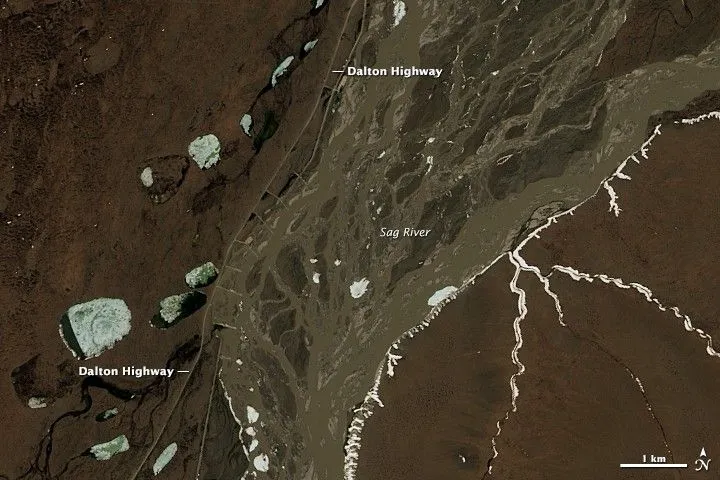
Top image: Flooding of Dalton Highway. NASA Earth Observatory images by Joshua Stevens, using Landsat data from the U.S. Geological Survey.